Leopard Man
Oooooh. Ooooh er. Oh my.
Boy, am I glad I didn’t stay up for that. Boring! Where’s the iMiniProBookMacChat? WHERE? What have you done with it? And don’t even get me started on the ONE TRUE VIDEO IPOD. I still believe, and it says in the Book of iPod that those who believe shall receive an OTVI on the day of reckoning.
I should probably start making sense — Apple had its WWDC last night. Rumours abounded as they always do but aside from introducing the chunkiest Mac ever not a lot happened. I was hoping for some new Finder goodness in their new OS, Leopard, but nothing. They’re probably just holding back, the teases. There’s still half a year until it comes out. Whether it beats Vista remains to be seen.
What I loved was Time Machine, the new backup application. Specify specific folders for backing up, and then you can browse them like this:
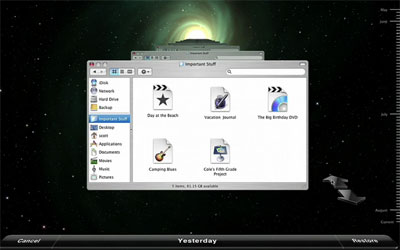
Just drag to and fro and travel back and forwards in time. Awesome. Just be sure you don’t cross your own time stream. Jobs was unclear as to the specifics but it seems that if you meet yourself browsing your backup from the future then it have catastrophic implications for the fabric of space-time, or at the very least cause a kernel panic. Disappointingly, you can’t change your computer’s history — unless you were meant to, in which case, for god’s sake, don’t not change it.
Having attempted to switch to iChat the other day, the awesome improvements to that app were a little more exciting than they otherwise would have been. Screen sharing, presentations, tabs, all the IM networks…
Huh. That makes all the work I just did connecting Gtalk to ICQ, MSN and AIM seem a bit useless. But you kids at home can do it, and talk to all your contacts even in the little gmail sidebar. All you need to do is to give your password to any one of hundreds of obscure jabber servers. It’s unclear as yet whether iChat can voice chat to PC users using Gtalk but I’m hopeful.
If you want more detail on Steve Jobs’ keynote, then go to the people you know you can trust.